Restored from the project wiki (we.riseup.net), which is no longer online.
To protect data from seizure, the simplest and most effective solution is disk encryption. In practice, this requires entering a password when the computer starts. If the password is kept secret, the contents of the disk will be undecipherable.
NOTE: encrypting the system disk does not protect data placed on usb sticks or external disks
A further reason to choose to encrypt the disk is the possibility of downloading your email with Thunderbird, keeping it away from the mail servers and storing it safely on your encrypted disk.
We have not included instructions for Windows so as not to give a false sense of security: using full disk encryption with windows protects very little, since the system is very vulnerable to viruses and malware
Although it tends to be more secure than Windows, Mac OSX is also vulnerable to malware; for this reason, even though it is possible to encrypt it completely, here too the advice is to abandon it in favour of a free operating system.
The more recent distributions make it very simple to create encrypted systems.
In general GNU/Linux systems (and many UNIX systems), unlike other proprietary systems, provide several encryption tools already integrated with the operating system and widely supported by the development community.
Installation difficulty: easy
Day-to-day difficulty: none
Encrypting the disk is easy, but it has to be done at installation time, not afterwards.
On ubuntu and xubuntu, it is enough to select a simple option during installation to enable encryption.
Guide:
www.oneopensource.it/03/09/2012/ubuntu-...
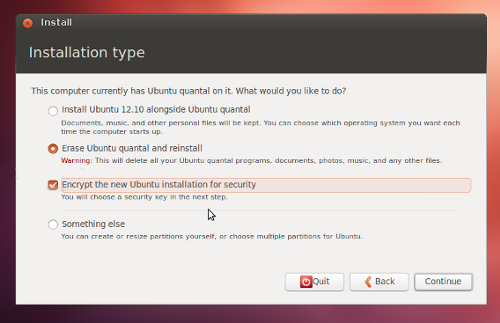
Configuration difficulty: medium/easy
Day-to-day difficulty: none.
If you do not want to do a fresh installation, but you have an ubuntu system, a slightly less secure form of encryption is still possible: rather than encrypting the whole operating system it is possible to encrypt only the users’ data.
This, although encrypting the whole disk is preferable, still remains a very sound solution.
www.howtogeek.com/116032/how-to-encrypt...
Encryption for mac os x is very simple to achieve, because it can also be enabled on an already-installed system with a few clicks, provided that at least half the disk is free.
If that is not the case, it is enough to move some data (temporarily) to an external disk, perform the conversion, and then copy it back onto your computer.
The procedure will take many hours (up to ten or so, depending on the size of the data on the disk), so it is best to start it at night, making sure the computer is plugged in.
Note: to encrypt the whole disk you need Mac OS X Lion 10.7 or later.
These guides, although in English, are very simple. A crucial note has to be made about the storing of the “recovery key” (a password that lets you recover the data if the operations do not succeed) by Apple. You should under no circumstances accept that apple stores the recovery key: such a choice would make the encryption of your system completely pointless.
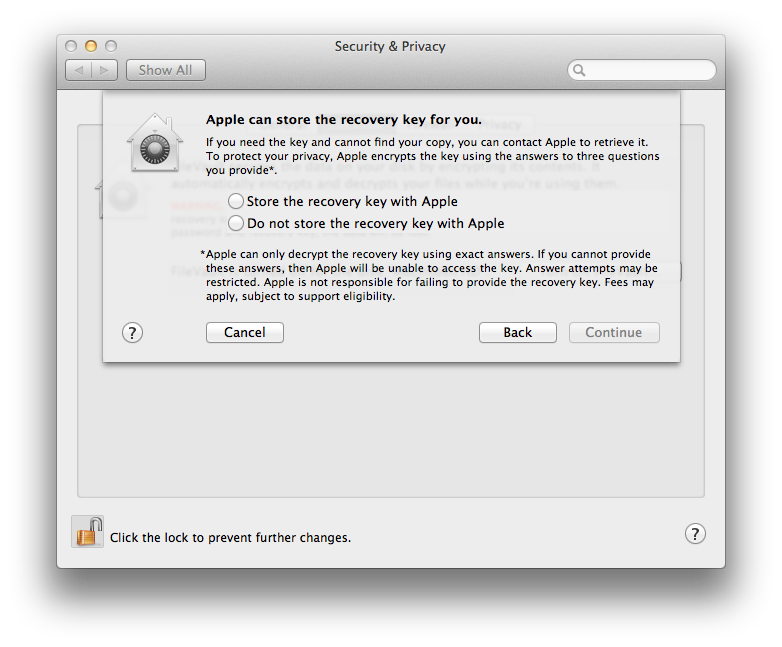
macosrumors.com/2011/02/27/full-system-...
support.apple.com/kb/HT4790
Note: to encrypt the home you need Mac OS X Panther 10.3 or later; that is a 2003 version, so it is very likely that your mac is suitable.
If you have a system earlier than Lion, a slightly less secure form of encryption is still possible: rather than encrypting the whole operating system it is possible to encrypt only the users’ data.
This, although encrypting the whole disk is preferable, still remains a very sound solution.
www.dummies.com/how-to/content/how-to-s...